Come back to the page that matters.
A note is only useful if you see it again at the right moment. Save a page for later, open Review before your next call, and find anything else by the words on it.
Free, in every notebook.
Tap the bookmark. Pick when you want it back.
The Review tab on your shelf shows the pages due today, from every notebook. Open the page, or reread it right there. Nothing due? It says so, and you can look ahead.
Tonight or tomorrow
For the follow-up email, or the question you want to ask first thing.
A date of your own
Bring a page back the day before the next meeting.
Someday
For ideas that aren’t urgent but shouldn’t get lost.
A nudge, if you want one
Optional notifications and a badge on the app icon.
Find it by the words on the page.
Search the words you typed, and the words dictation wrote out for you. Search for “launch” and the page from the client call turns up, sketch and recording included.
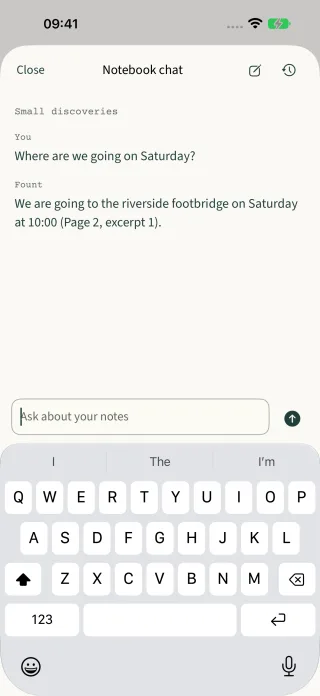
Ask your notebook.
Ask “Where are we going on Saturday?” Notebook chat answers from the written pages in the open notebook and gives you the page numbers, so you can check. Drawings and recordings are outside its scope, and locked notebooks stay out unless you unlock them.
Requires iOS 26 or later and Apple Intelligence on a compatible iPhone.
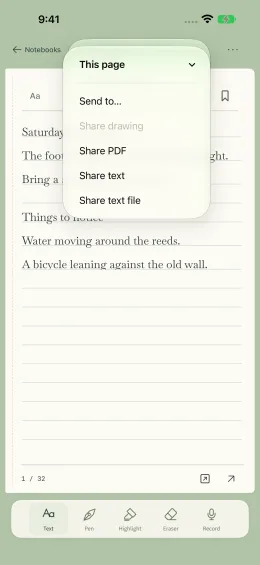
Show someone exactly what you wrote.
- As an image. Choose a size, or select just the passage you want to share. Nothing gets cut off.
- A drawing. Draw a frame around the sketch; only the strokes inside it come along.
- As a PDF. One page, writing and drawing together.
- As text. To Messages, Mail, or an assistant like ChatGPT or Claude.